
The processWave.org Diagram Editor is back - on Google+!
The Diagram Editor for Google+ Hangouts enables you to collaboratively create diagrams with your friends while you videochat with them in a Google+ Hangout: Everyone can contribute to the diagram and everyone sees your edit in realtime. It feels like all your friends are hanging out in the same conference room editing the diagram on a giant whiteboard without the need for being in the same physical location. It basically brings all the advantages of collaborative diagram editing you are used to from Google Wave to Google+ Hangouts. Watch the screencast to learn more:
Unfortunately, Google has not yet released Hangouts API to the general public. Once they do, you’ll be able to take the Diagram Editor for Google+ Hangouts for a test spin and I will tell you on this very blog how to do that. Stay tuned!
Meanwhile, you can check out the code of the project on Google Code or learn more about the diagram editor on Google+.
Update: The project has been moved to GitHub.
Try the processWave.org Diagram Editor now!
Use the processWave.org Editor in Google Wave (discontinued).
Watch the screencasts showing the editor in Google Wave or Google+ Hangouts.
Check out our MIT-licensed source code on GitHub.
October 6, 2011


December 23, 2010
Hello, Shared Spaces!
Update (Oct 15, 2011): Google has discontinued Shared Spaces and integrated its technology into Google+ Hangouts. The processWave.org Editor for Shared Spaces is no longer available, but you should check out its integration into Google+ Hangouts!
Google has created a new home for Wave gadgets: Google Shared Spaces. Google says it is an “easy way for you to share mini-collaborative applications, like scheduling tools or games, with your friends or colleagues”. Of course, you can also include our very own processWave.org Editor in a Shared Space. To get started with a new Space, just click here and send the link to your friends inviting them to a collaborative modeling session! To participate, they just need a Google, Twitter or Yahoo account.
PS: Are you planning on developing your own gadget for Shared Spaces? Check out our syncro library for concurrent editing.
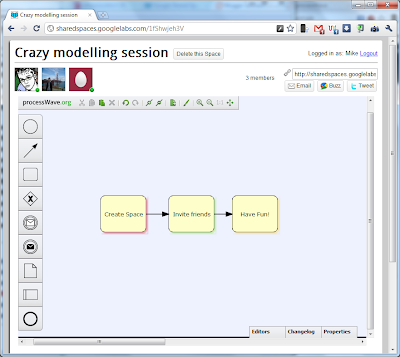
Google has created a new home for Wave gadgets: Google Shared Spaces. Google says it is an “easy way for you to share mini-collaborative applications, like scheduling tools or games, with your friends or colleagues”. Of course, you can also include our very own processWave.org Editor in a Shared Space. To get started with a new Space, just click here and send the link to your friends inviting them to a collaborative modeling session! To participate, they just need a Google, Twitter or Yahoo account.
PS: Are you planning on developing your own gadget for Shared Spaces? Check out our syncro library for concurrent editing.

August 8, 2010
Good Bye, Wave!
Some days ago, Google announced that it will stop working on the Wave project. That made us kind of sad as we had fun working with this awesome product and we enjoyed talking to the Wave developers at the Google I/O 2010. We are now wondering, what crazy project the guys from the Wave team will start up next...
By the way, if you want to learn more about our development experience with Google Wave, you should check out our bachelor theses. They are available for download and also cover some interesting technical details of the processWave.org editor.
It was fun working together with you all and thanks a lot for your valuable feedback! If you have any further questions about the processWave.org team or our editor do not hesitate to drop us an email.
Good bye!
the processWave.org team
PS: If you need to get your models off the Wave before Google shuts off the Wave servers, check out our new export feature.
By the way, if you want to learn more about our development experience with Google Wave, you should check out our bachelor theses. They are available for download and also cover some interesting technical details of the processWave.org editor.
It was fun working together with you all and thanks a lot for your valuable feedback! If you have any further questions about the processWave.org team or our editor do not hesitate to drop us an email.
Good bye!
the processWave.org team
PS: If you need to get your models off the Wave before Google shuts off the Wave servers, check out our new export feature.
August 6, 2010
New Features: Export and Import of Models
The most requested features for the processWave.org editor are the export and import of models. We listened to our users and are pleased to announce the integration of those most requested features. From today on you can export your models from the processWave.org Editor to the web-based ORYX editor, where the models can be further processed and saved in various formats (including PDF). In addition to that, you can also import your models from the ORYX editor repository to share them with your fiends in the Wave. Read on to learn, how you can use those two brand-new features of the processWave.org editor.
Export of Models
Import of Models
Export of Models
- Add our gadget to a wave, choose one of our six modeling languages and create a model of your choice.

- Click on the new "Export to the Oryx editor" button in the toolbar.

- A new tab opens that should show the created model inside the Oryx editor. At this time, you are able to export the model in various data formats: XPDL, RDF, ERDF, BPMN 2.0 DI XML or JSON. The options that are available are shown in the export menu in the Oryx toolbar on the right.
- For more export formats like PDF or PNG, you need to save the model into your personal model repository, first. However, saving via the save button only works for logged in users. Therefore, please open a new browser tab and visit http://oryx-project.org/backend/poem/repository. You will see the global repository with public models created by Oryx users and shared with the world. To log in, enter your OpenID in the top right corner of the page. If you don't have an OpenID yet, you can get a free one here: www.getopenid.com

- Once you are logged in, return to the tab with your model from 3. Now, you can click the save button, enter a name for the model, and save it to your personal process repository. When you return to http://oryx-project.org/backend/poem/repository and refresh the site, it should now show your new model. Of course, your model is by default not shared with anyone else and can only be accessed from your OpenID account.

- If you now select your model by clicking on it, you can find various export options at the bottom left corner of the site. Click on one of the links, like SVG, PDF, PNG to export your diagram in these graphics formats.


Import of Models
- Go to http://oryx-project.org/backend/poem/repository and login with your OpenID. Now, you can see all models that you have access to.

- Click on the model you want to import to the processWave.org editor. Make sure that the model is public by checking the access rights in the top right corner. At the moment, it is only possible to import public models to the Wave, so if your model is not public yet, click on the publishing icon.

- When you are sure the model is public, double-click on the model to open it in the Oryx editor. Look for the export menu in the Oryx toolbar and choose "ProcessWave This!".
- A new window opens that asks for permission to create a new wave. Click "continue".
- The new wave with the title "Oryx Model Export" is shown and contains a processWave.org editor gadget with your model. You can now rename the wave, invite friends to model collaboratively or even export the model back to your Oryx repository via the export button.


July 26, 2010
Our Google I/O presentation on YouTube
Our talk at this year's Google I/O is available on YouTube. Check it out! The presentation of our processWave.org Editor starts at minute 25.
June 1, 2010
Google I/O 2010 Wrap-up
We are back from Google I/O 2010. It was an awesome experience for us! We got a lot of valuable feedback and had many interesting conversations. Thanks to all of you who joined us in the sandbox or during our talk.

PS: For those of you, who could not attend the I/O: Starting next week you will be able to watch our talk on YouTube.
May 18, 2010
The processWave.org Editor
We are happy to announce the release of the processWave.org Editor, a fully collaborative diagram editor for Google Wave.
The processWave.org Editor is a new approach to modeling tools, aiming to make the creation of diagrams an inherently collaborative process.
Try it out now!
Try the processWave.org Editor now by using the installer in this Wave.
Watch the screencast
Real-time collaboration
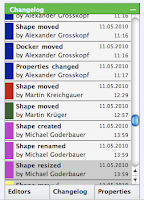 The processWave.org Editor utilizes the technology of Google Wave: No matter how many people are editing one diagram, changes will be propagated in near real-time.
To make keeping track of changes easy, a changelog lists all actions that were performed on the diagram. Additionally, the changelog doubles as a time machine. With it you can revert the diagram to any previous state it was in at some point of time.
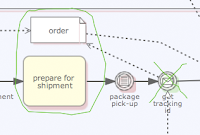
To communicate with other modelers you can annotate the diagram by simply drawing on it. This way you point out modeling errors and suggest improvements. You can also use this feature for real-time communication, e.g. to support a point you make via voice chat.
Extensibility
The processWave.org Editor is open sourced under the terms of the MIT license. It offers a powerful plugin system which makes it easy to add new features as well as modeling languages. You can check out the code on http://code.google.com/p/processwave/
The processWave.org Editor is based on the mature web-based diagram editor ORYX. We currently support five modeling languages:
The processWave.org Editor is a new approach to modeling tools, aiming to make the creation of diagrams an inherently collaborative process.
Try it out now!
Try the processWave.org Editor now by using the installer in this Wave.
Watch the screencast
Real-time collaboration
 The processWave.org Editor utilizes the technology of Google Wave: No matter how many people are editing one diagram, changes will be propagated in near real-time.
To make keeping track of changes easy, a changelog lists all actions that were performed on the diagram. Additionally, the changelog doubles as a time machine. With it you can revert the diagram to any previous state it was in at some point of time.

To communicate with other modelers you can annotate the diagram by simply drawing on it. This way you point out modeling errors and suggest improvements. You can also use this feature for real-time communication, e.g. to support a point you make via voice chat.
Extensibility
The processWave.org Editor is open sourced under the terms of the MIT license. It offers a powerful plugin system which makes it easy to add new features as well as modeling languages. You can check out the code on http://code.google.com/p/processwave/
Five modeling languages
The processWave.org Editor is based on the mature web-based diagram editor ORYX. We currently support five modeling languages:
- Unified Modelling Language (UML) class diagrams
- Business Process Modelling Notation (BPMN)
- Fundamental Modelling Concepts (FMC) block diagrams
- Petri nets
- Event-driven Process Chains (EPC)

Subscribe to:
Posts (Atom)


